Self-Hosting Supabase on PostgreSQL
Supabase is great, own your own Supabase is even better. Here’s a comprehensive tutorial for self-hosting production-grade supabase on local/cloud VM/BMs.
What is Supabase?
Supabase is an open-source Firebase alternative, a Backend as a Service (BaaS).
Supabase wraps PostgreSQL kernel and vector extensions, alone with authentication, realtime subscriptions, edge functions, object storage, and instant REST and GraphQL APIs from your postgres schema. It let you skip most backend work, requiring only database design and frontend skills to ship quickly.
Currently, Supabase may be the most popular open-source project in the PostgreSQL ecosystem, boasting over 74,000 stars on GitHub. And become quite popular among developers, and startups, since they have a generous free plan, just like cloudflare & neon.
Why Self-Hosting?
Supabase’s slogan is: “Build in a weekend, Scale to millions”. It has great cost-effectiveness in small scales (4c8g) indeed. But there is no doubt that when you really grow to millions of users, some may choose to self-hosting their own Supabase —— for functionality, performance, cost, and other reasons.
That’s where Pigsty comes in. Pigsty provides a complete one-click self-hosting solution for Supabase. Self-hosted Supabase can enjoy full PostgreSQL monitoring, IaC, PITR, and high availability capability,
You can run the latest PostgreSQL 17(,16,15,14) kernels, (supabase is using the 15 currently), alone with 390 PostgreSQL extensions out-of-the-box. Run on mainstream Linus OS distros with production grade HA PostgreSQL, MinIO, Prometheus & Grafana Stack for observability, and Nginx for reverse proxy.
TIME: timescaledb timescaledb_toolkit timeseries periods temporal_tables emaj table_version pg_cron pg_later pg_background
GIS: postgis postgis_topology postgis_raster postgis_sfcgal postgis_tiger_geocoder address_standardizer address_standardizer_data_us pgrouting pointcloud pointcloud_postgis h3 h3_postgis q3c ogr_fdw geoip pg_polyline pg_geohash mobilitydb earthdistance
RAG: vector vectorscale vectorize pg_similarity smlar pg_summarize pg_tiktoken pgml pg4ml
FTS: pg_search pg_bigm zhparser hunspell_cs_cz hunspell_de_de hunspell_en_us hunspell_fr hunspell_ne_np hunspell_nl_nl hunspell_nn_no hunspell_pt_pt hunspell_ru_ru hunspell_ru_ru_aot fuzzystrmatch pg_trgm
OLAP: citus citus_columnar columnar pg_analytics pg_duckdb pg_mooncake duckdb_fdw pg_parquet pg_fkpart pg_partman plproxy pg_strom tablefunc
FEAT: age hll rum pg_graphql pg_jsonschema jsquery pg_hint_plan hypopg index_advisor plan_filter imgsmlr pg_ivm pgmq pgq pg_cardano rdkit bloom
LANG: pg_tle plv8 pllua hstore_pllua plluau hstore_plluau plprql pldbgapi plpgsql_check plprofiler plsh pljava plr pgtap faker dbt2 pltcl pltclu plperl bool_plperl hstore_plperl jsonb_plperl plperlu bool_plperlu jsonb_plperlu hstore_plperlu plpgsql plpython3u jsonb_plpython3u ltree_plpython3u hstore_plpython3u
TYPE: prefix semver unit md5hash asn1oid roaringbitmap pgfaceting pg_sphere country currency pgmp numeral pg_rational uint uint128 ip4r uri pgemailaddr acl debversion pg_rrule timestamp9 chkpass isn seg cube ltree hstore citext xml2
FUNC: topn gzip zstd http pg_net pg_smtp_client pg_html5_email_address pgsql_tweaks pg_extra_time timeit count_distinct extra_window_functions first_last_agg tdigest aggs_for_vecs aggs_for_arrays arraymath quantile lower_quantile pg_idkit pg_uuidv7 permuteseq pg_hashids sequential_uuids pg_math random base36 base62 pg_base58 floatvec financial pgjwt pg_hashlib shacrypt cryptint pguecc pgpcre icu_ext pgqr envvar pg_protobuf url_encode refint autoinc insert_username moddatetime tsm_system_time dict_xsyn tsm_system_rows tcn uuid-ossp btree_gist btree_gin intarray intagg dict_int unaccent
ADMIN: pg_repack pg_squeeze pg_dirtyread pgfincore pgdd ddlx prioritize pg_checksums pg_readonly safeupdate pg_permissions pgautofailover pg_catcheck pre_prepare pgcozy pg_orphaned pg_crash pg_cheat_funcs pg_savior table_log pg_fio pgpool_adm pgpool_recovery pgpool_regclass pgagent vacuumlo pg_prewarm oid2name lo basic_archive basebackup_to_shell old_snapshot adminpack amcheck pg_surgery
STAT: pg_profile pg_show_plans pg_stat_kcache pg_stat_monitor pg_qualstats pg_store_plans pg_track_settings pg_wait_sampling system_stats meta pgnodemx pg_proctab pg_sqlog bgw_replstatus pgmeminfo toastinfo explain_ui pg_relusage pg_top pagevis powa pageinspect pgrowlocks sslinfo pg_buffercache pg_walinspect pg_freespacemap pg_visibility pgstattuple auto_explain pg_stat_statements
SEC: passwordcheck_cracklib supautils pgsodium supabase_vault pg_session_jwt anon pg_tde pgsmcrypto pgaudit pgauditlogtofile pg_auth_mon credcheck pgcryptokey pg_jobmon logerrors login_hook set_user pg_snakeoil pgextwlist pg_auditor sslutils noset sepgsql auth_delay pgcrypto passwordcheck
FDW: wrappers multicorn odbc_fdw jdbc_fdw mysql_fdw oracle_fdw tds_fdw db2_fdw sqlite_fdw pgbouncer_fdw mongo_fdw redis_fdw redis kafka_fdw hdfs_fdw firebird_fdw aws_s3 log_fdw dblink file_fdw postgres_fdw
SIM: orafce pgtt session_variable pg_statement_rollback pg_dbms_metadata pg_dbms_lock pg_dbms_job babelfishpg_common babelfishpg_tsql babelfishpg_tds babelfishpg_money pgmemcache
ETL: pglogical pglogical_origin pglogical_ticker pgl_ddl_deploy pg_failover_slots wal2json wal2mongo decoderbufs decoder_raw test_decoding mimeo repmgr pg_fact_loader pg_bulkload
Since most of the supabase maintained extensions are not available in the official PGDG repo, we have compiled all the RPM/DEBs for these extensions and put them in the Pigsty repo: pg_graphql, pg_jsonschema, wrappers, index_advisor, pg_net, vault, pgjwt, supautils, pg_plan_filter,
Everything is under your control, you have the ability and freedom to scale PGSQL, MinIO, and Supabase itself. And take full advantage of the performance and cost advantages of modern hardware like Gen5 NVMe SSD.
All you need is prepare a VM with several commands and wait for 10 minutes….
Get Started
First, download & install pigsty as usual, with the supa config template:
 curl -fsSL https://repo.pigsty.io/get | bash
./bootstrap          # install deps (ansible)
./configure -c supa  # use supa config template (IMPORTANT: CHANGE PASSWORDS!)
./deploy.yml         # install pigsty, create ha postgres & minio clusters
Please change the
pigsty.ymlconfig file according to your need before deploying Supabase. (Credentials) For dev/test/demo purposes, we will just skip that, and comes back later.
Then, run the supabase.yml to launch stateless part of supabase.
./supabase.yml # launch stateless supabase containers with docker compose
You can access the supabase API / Web UI through the 8000/8443 directly.
with configured DNS, or a local /etc/hosts entry, you can also use the default supa.pigsty domain name via the 80/443 infra portal.
Credentials for Supabase Studio:
supabase:pigsty

Architecture
Pigsty’s supabase is based on the Supabase Docker Compose Template, with some slight modifications to fit-in Pigsty’s default ACL model.
The stateful part of this template is replaced by Pigsty’s managed PostgreSQL cluster and MinIO cluster. The container part are stateless, so you can launch / destroy / run multiple supabase containers on the same stateful PGSQL / MINIO cluster simultaneously to scale out.
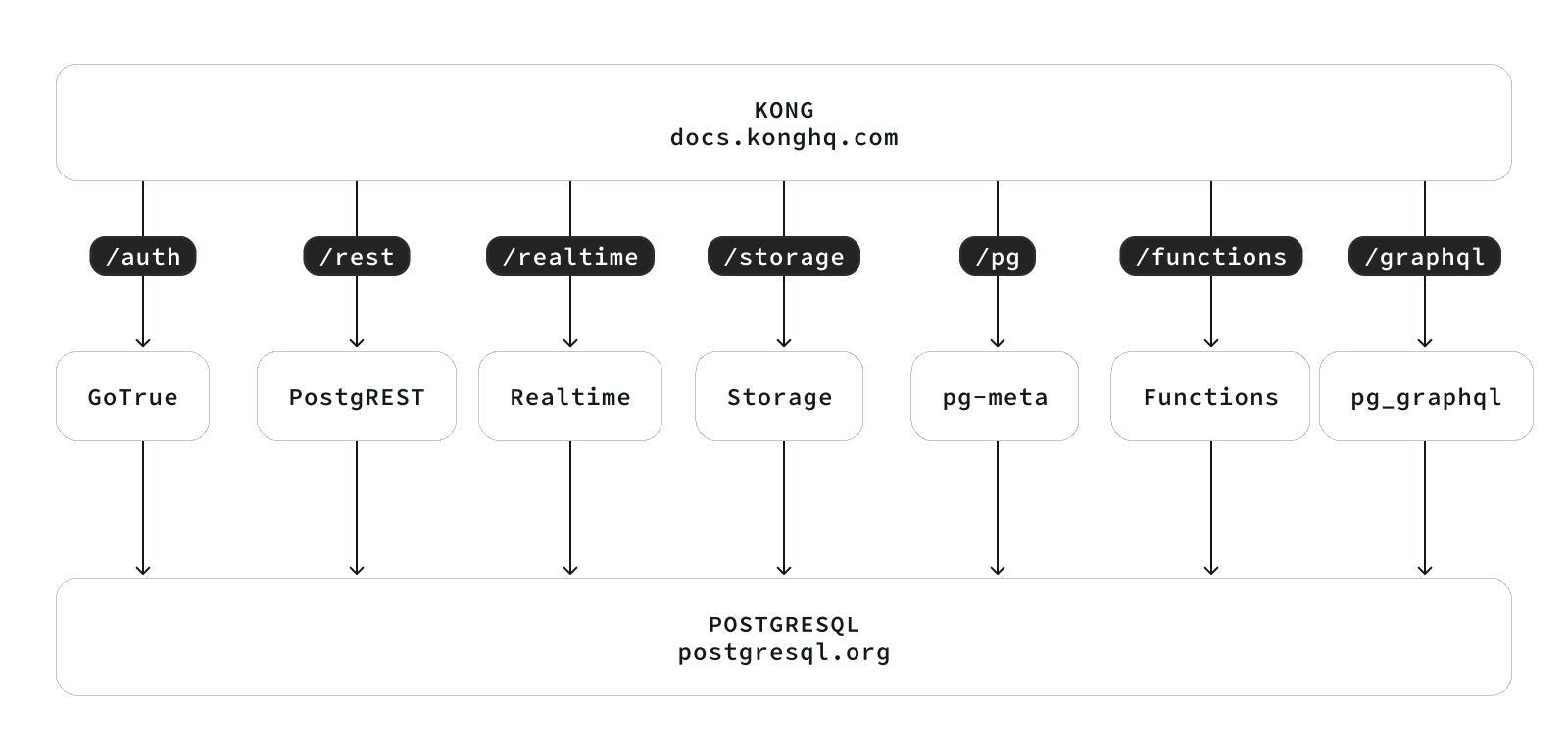
The built-in supa.yml config template will create a single-node supabase, with a singleton PostgreSQL and SNSD MinIO server.
You can use Multinode PostgreSQL Clusters and MNMD MinIO Clusters / external S3 service instead in production, we will cover that later.
Config Detail
Here are checklists for self-hosting
- Hardware: necessary VM/BM resources, one node at least, 3-4 are recommended for HA.
- Linux OS: Linux x86_64 server with fresh installed Linux, check compatible distro
- Network: Static IPv4 address which can be used as node identity
- Admin User: nopass ssh & sudo are recommended for admin user
- Conf Template: Use the
supaconfig template, if you don’t know how to manually configure pigsty
The built-in supa.yml config template is shown below.
The supa Config Template
all:
  children:

    # infra cluster for proxy, monitor, alert, etc..
    infra: { hosts: { 10.10.10.10: { infra_seq: 1 } } }

    # etcd cluster for ha postgres
    etcd: { hosts: { 10.10.10.10: { etcd_seq: 1 } }, vars: { etcd_cluster: etcd } }

    # minio cluster, s3 compatible object storage
    minio: { hosts: { 10.10.10.10: { minio_seq: 1 } }, vars: { minio_cluster: minio } }

    # pg-meta, the underlying postgres database for supabase
    pg-meta:
      hosts: { 10.10.10.10: { pg_seq: 1, pg_role: primary } }
      vars:
        pg_cluster: pg-meta
        pg_users:
          # supabase roles: anon, authenticated, dashboard_user
          - { name: anon           ,login: false }
          - { name: authenticated  ,login: false }
          - { name: dashboard_user ,login: false ,replication: true ,createdb: true ,createrole: true }
          - { name: service_role   ,login: false ,bypassrls: true }
          # supabase users: please use the same password
          - { name: supabase_admin             ,password: 'DBUser.Supa' ,pgbouncer: true ,inherit: true   ,roles: [ dbrole_admin ] ,superuser: true ,replication: true ,createdb: true ,createrole: true ,bypassrls: true }
          - { name: authenticator              ,password: 'DBUser.Supa' ,pgbouncer: true ,inherit: false  ,roles: [ dbrole_admin, authenticated ,anon ,service_role ] }
          - { name: supabase_auth_admin        ,password: 'DBUser.Supa' ,pgbouncer: true ,inherit: false  ,roles: [ dbrole_admin ] ,createrole: true }
          - { name: supabase_storage_admin     ,password: 'DBUser.Supa' ,pgbouncer: true ,inherit: false  ,roles: [ dbrole_admin, authenticated ,anon ,service_role ] ,createrole: true }
          - { name: supabase_functions_admin   ,password: 'DBUser.Supa' ,pgbouncer: true ,inherit: false  ,roles: [ dbrole_admin ] ,createrole: true }
          - { name: supabase_replication_admin ,password: 'DBUser.Supa' ,replication: true ,roles: [ dbrole_admin ]}
          - { name: supabase_read_only_user    ,password: 'DBUser.Supa' ,bypassrls: true ,roles: [ dbrole_readonly, pg_read_all_data ] }
        pg_databases:
          - name: postgres
            baseline: supabase.sql
            owner: supabase_admin
            comment: supabase postgres database
            schemas: [ extensions ,auth ,realtime ,storage ,graphql_public ,supabase_functions ,_analytics ,_realtime ]
            extensions:
              - { name: pgcrypto  ,schema: extensions  } # 1.3   : cryptographic functions
              - { name: pg_net    ,schema: extensions  } # 0.9.2 : async HTTP
              - { name: pgjwt     ,schema: extensions  } # 0.2.0 : json web token API for postgres
              - { name: uuid-ossp ,schema: extensions  } # 1.1   : generate universally unique identifiers (UUIDs)
              - { name: pgsodium        }                # 3.1.9 : pgsodium is a modern cryptography library for Postgres.
              - { name: supabase_vault  }                # 0.2.8 : Supabase Vault Extension
              - { name: pg_graphql      }                # 1.5.9 : pg_graphql: GraphQL support
              - { name: pg_jsonschema   }                # 0.3.3 : pg_jsonschema: Validate json schema
              - { name: wrappers        }                # 0.4.3 : wrappers: FDW collections
              - { name: http            }                # 1.6   : http: allows web page retrieval inside the database.
              - { name: pg_cron         }                # 1.6   : pg_cron: Job scheduler for PostgreSQL
              - { name: timescaledb     }                # 2.17  : timescaledb: Enables scalable inserts and complex queries for time-series data
              - { name: pg_tle          }                # 1.2   : pg_tle: Trusted Language Extensions for PostgreSQL
              - { name: vector          }                # 0.8.0 : pgvector: the vector similarity search
        # supabase required extensions
        pg_libs: 'pg_stat_statements, plpgsql, plpgsql_check, pg_cron, pg_net, timescaledb, auto_explain, pg_tle, plan_filter'
        pg_extensions: # extensions to be installed on this cluster
          - supabase   # essential extensions for supabase
          - timescaledb postgis pg_graphql pg_jsonschema wrappers pg_search pg_analytics pg_parquet plv8 duckdb_fdw pg_cron pg_timetable pgqr
          - supautils pg_plan_filter passwordcheck plpgsql_check pgaudit pgsodium pg_vault pgjwt pg_ecdsa pg_session_jwt index_advisor
          - pgvector pgvectorscale pg_summarize pg_tiktoken pg_tle pg_stat_monitor hypopg pg_hint_plan pg_http pg_net pg_smtp_client pg_idkit
        pg_parameters:
          cron.database_name: postgres
          pgsodium.enable_event_trigger: off
        pg_hba_rules: # supabase hba rules, require access from docker network
          - { user: all ,db: postgres  ,addr: intra         ,auth: pwd ,title: 'allow supabase access from intranet'    }
          - { user: all ,db: postgres  ,addr: 172.17.0.0/16 ,auth: pwd ,title: 'allow access from local docker network' }
        node_crontab: [ '00 01 * * * postgres /pg/bin/pg-backup full' ] # make a full backup every 1am

    # launch supabase stateless part with docker compose: ./supabase.yml
    supabase:
      hosts:
        10.10.10.10: { supa_seq: 1 }  # instance id
      vars:
        supa_cluster: supa            # cluster name
        docker_enabled: true          # enable docker

        # use these to pull docker images via proxy and mirror registries
        #docker_registry_mirrors: ['https://docker.xxxxx.io']
        #proxy_env:   # add [OPTIONAL] proxy env to /etc/docker/daemon.json configuration file
        #  no_proxy: "localhost,127.0.0.1,10.0.0.0/8,192.168.0.0/16,*.pigsty,*.aliyun.com,mirrors.*,*.myqcloud.com,*.tsinghua.edu.cn"
        #  #all_proxy: http://user:pass@host:port

        # these configuration entries will OVERWRITE or APPEND to /opt/supabase/.env file (src template: app/supabase/.env)
        # check https://github.com/pgsty/pigsty/blob/main/app/supabase/.env for default values
        supa_config:

          # IMPORTANT: CHANGE JWT_SECRET AND REGENERATE CREDENTIAL ACCORDING!!!!!!!!!!!
          # https://supabase.com/docs/guides/self-hosting/docker#securing-your-services
          jwt_secret: your-super-secret-jwt-token-with-at-least-32-characters-long
          anon_key: eyJhbGciOiJIUzI1NiIsInR5cCI6IkpXVCJ9.eyAgCiAgICAicm9sZSI6ICJhbm9uIiwKICAgICJpc3MiOiAic3VwYWJhc2UtZGVtbyIsCiAgICAiaWF0IjogMTY0MTc2OTIwMCwKICAgICJleHAiOiAxNzk5NTM1NjAwCn0.dc_X5iR_VP_qT0zsiyj_I_OZ2T9FtRU2BBNWN8Bu4GE
          service_role_key: eyJhbGciOiJIUzI1NiIsInR5cCI6IkpXVCJ9.eyAgCiAgICAicm9sZSI6ICJzZXJ2aWNlX3JvbGUiLAogICAgImlzcyI6ICJzdXBhYmFzZS1kZW1vIiwKICAgICJpYXQiOiAxNjQxNzY5MjAwLAogICAgImV4cCI6IDE3OTk1MzU2MDAKfQ.DaYlNEoUrrEn2Ig7tqibS-PHK5vgusbcbo7X36XVt4Q
          dashboard_username: supabase
          dashboard_password: pigsty

          # postgres connection string (use the correct ip and port)
          postgres_host: 10.10.10.10
          postgres_port: 5436             # access via the 'default' service, which always route to the primary postgres
          postgres_db: postgres
          postgres_password: DBUser.Supa  # password for supabase_admin and multiple supabase users

          # expose supabase via domain name
          site_url: http://supa.pigsty
          api_external_url: http://supa.pigsty
          supabase_public_url: http://supa.pigsty

          # if using s3/minio as file storage
          s3_bucket: supa
          s3_endpoint: https://sss.pigsty:9000
          s3_access_key: supabase
          s3_secret_key: S3User.Supabase
          s3_force_path_style: true
          s3_protocol: https
          s3_region: stub
          minio_domain_ip: 10.10.10.10  # sss.pigsty domain name will resolve to this ip statically

          # if using SMTP (optional)
          #smtp_admin_email: admin@example.com
          #smtp_host: supabase-mail
          #smtp_port: 2500
          #smtp_user: fake_mail_user
          #smtp_pass: fake_mail_password
          #smtp_sender_name: fake_sender
          #enable_anonymous_users: false


  vars:
    version: v3.1.0                   # pigsty version string
    admin_ip: 10.10.10.10             # admin node ip address
    region: default                   # upstream mirror region: default|china|europe
    node_tune: oltp                   # node tuning specs: oltp,olap,tiny,crit
    pg_conf: oltp.yml                 # pgsql tuning specs: {oltp,olap,tiny,crit}.yml
    infra_portal:                     # domain names and upstream servers
      home         : { domain: h.pigsty }
      grafana      : { domain: g.pigsty ,endpoint: "${admin_ip}:3000" , websocket: true }
      prometheus   : { domain: p.pigsty ,endpoint: "${admin_ip}:9090" }
      alertmanager : { domain: a.pigsty ,endpoint: "${admin_ip}:9093" }
      minio        : { domain: m.pigsty ,endpoint: "10.10.10.10:9001", https: true, websocket: true }
      blackbox     : { endpoint: "${admin_ip}:9115" }
      loki         : { endpoint: "${admin_ip}:3100" }  # expose supa studio UI and API via nginx
      supa         : { domain: supa.pigsty ,endpoint: "10.10.10.10:8000", websocket: true }

    #----------------------------------#
    # Credential: CHANGE THESE PASSWORDS
    #----------------------------------#
    #grafana_admin_username: admin
    grafana_admin_password: pigsty
    #pg_admin_username: dbuser_dba
    pg_admin_password: DBUser.DBA
    #pg_monitor_username: dbuser_monitor
    pg_monitor_password: DBUser.Monitor
    #pg_replication_username: replicator
    pg_replication_password: DBUser.Replicator
    #patroni_username: postgres
    patroni_password: Patroni.API
    #haproxy_admin_username: admin
    haproxy_admin_password: pigsty

    # use minio as supabase file storage, single node single driver mode for demonstration purpose
    minio_access_key: minioadmin      # root access key, `minioadmin` by default
    minio_secret_key: minioadmin      # root secret key, `minioadmin` by default
    minio_buckets: [ { name: pgsql }, { name: supa } ]
    minio_users:
      - { access_key: dba , secret_key: S3User.DBA, policy: consoleAdmin }
      - { access_key: pgbackrest , secret_key: S3User.Backup,   policy: readwrite }
      - { access_key: supabase   , secret_key: S3User.Supabase, policy: readwrite }
    minio_endpoint: https://sss.pigsty:9000    # explicit overwrite minio endpoint with haproxy port
    node_etc_hosts: ["10.10.10.10 sss.pigsty"] # domain name to access minio from all nodes (required)

    # use minio as default backup repo for PostgreSQL
    pgbackrest_method: minio          # pgbackrest repo method: local,minio,[user-defined...]
    pgbackrest_repo:                  # pgbackrest repo: https://pgbackrest.org/configuration.html#section-repository
      local:                          # default pgbackrest repo with local posix fs
        path: /pg/backup              # local backup directory, `/pg/backup` by default
        retention_full_type: count    # retention full backups by count
        retention_full: 2             # keep 2, at most 3 full backup when using local fs repo
      minio:                          # optional minio repo for pgbackrest
        type: s3                      # minio is s3-compatible, so s3 is used
        s3_endpoint: sss.pigsty       # minio endpoint domain name, `sss.pigsty` by default
        s3_region: us-east-1          # minio region, us-east-1 by default, useless for minio
        s3_bucket: pgsql              # minio bucket name, `pgsql` by default
        s3_key: pgbackrest            # minio user access key for pgbackrest
        s3_key_secret: S3User.Backup  # minio user secret key for pgbackrest
        s3_uri_style: path            # use path style uri for minio rather than host style
        path: /pgbackrest             # minio backup path, default is `/pgbackrest`
        storage_port: 9000            # minio port, 9000 by default
        storage_ca_file: /pg/cert/ca.crt  # minio ca file path, `/pg/cert/ca.crt` by default
        bundle: y                     # bundle small files into a single file
        cipher_type: aes-256-cbc      # enable AES encryption for remote backup repo
        cipher_pass: pgBackRest       # AES encryption password, default is 'pgBackRest'
        retention_full_type: time     # retention full backup by time on minio repo
        retention_full: 14            # keep full backup for last 14 days

    # download docker and supabase related extensions
    pg_version: 17
    repo_modules: node,pgsql,infra,docker
    repo_packages: [node-bootstrap, infra-package, infra-addons, node-package1, node-package2, pgsql-utility, docker ]
    repo_extra_packages:
      - pgsql-main
      - supabase   # essential extensions for supabase
      - timescaledb postgis pg_graphql pg_jsonschema wrappers pg_search pg_analytics pg_parquet plv8 duckdb_fdw pg_cron pg_timetable pgqr
      - supautils pg_plan_filter passwordcheck plpgsql_check pgaudit pgsodium pg_vault pgjwt pg_ecdsa pg_session_jwt index_advisor
      - pgvector pgvectorscale pg_summarize pg_tiktoken pg_tle pg_stat_monitor hypopg pg_hint_plan pg_http pg_net pg_smtp_client pg_idkit
For advanced topics, we may need to modify the configuration file to fit our needs.
- Security Enhancement
- Domain Name and HTTPS
- Sending Mail with SMTP
- MinIO or External S3
- True High Availability
Security Enhancement
For security reasons, you should change the default passwords in the pigsty.yml config file.
grafana_admin_password:pigsty, Grafana admin passwordpg_admin_password:DBUser.DBA, PGSQL superuser passwordpg_monitor_password:DBUser.Monitor, PGSQL monitor user passwordpg_replication_password:DBUser.Replicator, PGSQL replication user passwordpatroni_password:Patroni.API, Patroni HA Agent Passwordhaproxy_admin_password:pigsty, Load balancer admin passwordminio_access_key:minioadmin, MinIO root usernameminio_secret_key:minioadmin, MinIO root password
Supabase will use PostgreSQL & MinIO as its backend, so also change the following passwords for supabase business users:
pg_users: password for supabase business users in postgresminio_users:minioadmin, MinIO business user’s password
The pgbackrest will take backups and WALs to MinIO, so also change the following passwords reference
pgbackrest_repo: refer to the
PLEASE check the Supabase Self-Hosting: Generate API Keys to generate supabase credentials:
jwt_secret: a secret key with at least 40 charactersanon_key: a jwt token generate for anonymous users, based onjwt_secretservice_role_key: a jwt token generate for elevated service roles, based onjwt_secretdashboard_username: supabase studio web portal username,supabaseby defaultdashboard_password: supabase studio web portal password,pigstyby default
If you have chanaged the default password for PostgreSQL and MinIO, you have to update the following parameters as well:
postgres_password, according topg_userss3_access_keyands3_secret_key, according tominio_users
Domain Name and HTTPS
For local or intranet use, you can connect directly to Kong port on http://<IP>:8000 or 8443 for https.
This works but isn’t ideal. Using a domain with HTTPS is strongly recommended when serving Supabase to the public.
Pigsty has a Nginx server installed & configured on the admin node to act as a reverse proxy for all web based service. which is configured via the infra_portal parameter.
all:
  vars:     # global vars
    #.....
    infra_portal:  # domain names and upstream servers
      home         : { domain: h.pigsty }
      grafana      : { domain: g.pigsty ,endpoint: "${admin_ip}:3000" , websocket: true }
      prometheus   : { domain: p.pigsty ,endpoint: "${admin_ip}:9090" }
      alertmanager : { domain: a.pigsty ,endpoint: "${admin_ip}:9093" }
      minio        : { domain: m.pigsty ,endpoint: "10.10.10.10:9001", https: true, websocket: true }
      blackbox     : { endpoint: "${admin_ip}:9115" }
      loki         : { endpoint: "${admin_ip}:3100" }  # expose supa studio UI and API via nginx
      supa         : { domain: supa.pigsty ,endpoint: "10.10.10.10:8000", websocket: true }
On the client side, you can use the domain supa.pigsty to access the Supabase Studio management interface.
You can add this domain to your local /etc/hosts file or use a local DNS server to resolve it to the server’s external IP address.
To use a real domain with HTTPS, you will need to modify the all.vars.infra_portal.supa with updated domain name (such as supa.pigsty.cc here).
You can obtain a free HTTPS certificate from Let’s Encrypt, and just put the cert/key files in the specified path.
#supa : { domain: supa.pigsty ,endpoint: "10.10.10.10:8000", websocket: true }  # add your HTTPS certs/keys and specify the path
supa  : { domain: supa.pigsty.cc ,endpoint: "10.10.10.10:8000", websocket: true ,cert: /etc/cert/suap.pigsty.cc.crt ,key: /etc/cert/supa.pigsty.cc.key }
To reload the new configuration after installation, use the infra.yml playbook:
./infra.yml -t nginx_config,nginx_launch # reload nginx config
You also have to update the all.children.supabase.vars.supa_config to tell supabase to use the new domain name:
all:
  children:           # clusters
    supabase:         # supabase group
      vars:           # supabase param
        supa_config:  # supabase config

          # update supabase domain names here
          site_url: http://supa.pigsty.cc
          api_external_url: http://supa.pigsty.cc
          supabase_public_url: http://supa.pigsty.cc
And reload the supabase service to apply the new configuration:
./supabase.yml -t supa_config,supa_launch # reload supabase config
Sending Mail with SMTP
Some Supabase features require email. For production use, I’d recommend using an external SMTP service. Since self-hosted SMTP servers often result in rejected or spam-flagged emails.
To do this, modify the Supabase configuration and add SMTP credentials:
all:
  children:
    supabase:
      vars:
        supa_config:
          smtp_host: smtpdm.aliyun.com:80
          smtp_port: 80
          smtp_user: no_reply@mail.your.domain.com
          smtp_pass: your_email_user_password
          smtp_sender_name: MySupabase
          smtp_admin_email: adminxxx@mail.your.domain.com
          enable_anonymous_users: false
And don’t forget to reload the supabase service with ./supabase.yml -t supa_config,supa_launch
MinIO or External S3
Pigsty’s self-hosting supabase will use a local SNSD MinIO server, which is used by Supabase itself for object storage, and by PostgreSQL for backups. For production use, you should consider using a HA MNMD MinIO cluster or an external S3 compatible service instead.
We recommend using an external S3 when:
- you just have one single server available, then external s3 gives you a minimal disaster recovery guarantee, with RTO in hours and RPO in MBs.
- you are operating in the cloud, then using S3 directly is recommended rather than wrap expensively EBS with MinIO
The
terraform/spec/aliyun-meta-s3.tfprovides an example of how to provision a single node alone with an S3 bucket.
To use an external S3 compatible service, you’ll have to update two related references in the pigsty.yml config.
For example, to use Aliyun OSS as the object storage for Supabase, you can modify the all.children.supabase.vars.supa_config to point to the Aliyun OSS bucket:
all:
  children:
    supabase:
      vars:
        supa_config:
          s3_bucket: pigsty-oss
          s3_endpoint: https://oss-cn-beijing-internal.aliyuncs.com
          s3_access_key: xxxxxxxxxxxxxxxx
          s3_secret_key: xxxxxxxxxxxxxxxx
          s3_force_path_style: false
          s3_protocol: https
          s3_region: oss-cn-beijing
Reload the supabase service with ./supabase.yml -t supa_config,supa_launch again.
The next reference is in the PostgreSQL backup repo:
all:
  vars:
    # use minio as default backup repo for PostgreSQL
    pgbackrest_method: minio          # pgbackrest repo method: local,minio,[user-defined...]
    pgbackrest_repo:                  # pgbackrest repo: https://pgbackrest.org/configuration.html#section-repository
      local:                          # default pgbackrest repo with local posix fs
        path: /pg/backup              # local backup directory, `/pg/backup` by default
        retention_full_type: count    # retention full backups by count
        retention_full: 2             # keep 2, at most 3 full backup when using local fs repo
      minio:                          # optional minio repo for pgbackrest
        type: s3                      # minio is s3-compatible, so s3 is used

        # update your credentials here
        s3_endpoint: oss-cn-beijing-internal.aliyuncs.com
        s3_region: oss-cn-beijing
        s3_bucket: pigsty-oss
        s3_key: xxxxxxxxxxxxxx
        s3_key_secret: xxxxxxxx
        s3_uri_style: host

        path: /pgbackrest             # minio backup path, default is `/pgbackrest`
        storage_port: 9000            # minio port, 9000 by default
        storage_ca_file: /pg/cert/ca.crt  # minio ca file path, `/pg/cert/ca.crt` by default
        bundle: y                     # bundle small files into a single file
        cipher_type: aes-256-cbc      # enable AES encryption for remote backup repo
        cipher_pass: pgBackRest       # AES encryption password, default is 'pgBackRest'
        retention_full_type: time     # retention full backup by time on minio repo
        retention_full: 14            # keep full backup for last 14 days
After updating the pgbackrest_repo, you can reset the pgBackrest backup with ./pgsql.yml -t pgbackrest.
True High Availability
The default single-node deployment (with external S3) provide a minimal disaster recovery guarantee, with RTO in hours and RPO in MBs.
To achieve RTO < 30s and zero data loss, you need a multi-node high availability cluster with at least 3-nodes.
Which involves high availability for these components:
- ETCD: DCS requires at least three nodes to tolerate one node failure.
- PGSQL: PGSQL synchronous commit mode recommends at least three nodes.
- INFRA: It’s good to have two or three copies of observability stack.
- Supabase itself can also have multiple replicas to achieve high availability.
We recommend you to refer to the trio and safe config to upgrade your cluster to three nodes or more.
In this case, you also need to modify the access points for PostgreSQL and MinIO to use the DNS / L2 VIP / HAProxy HA access points.
all:
  children:
    supabase:
      hosts:
        10.10.10.10: { supa_seq: 1 }
        10.10.10.11: { supa_seq: 2 }
        10.10.10.12: { supa_seq: 3 }
      vars:
        supa_cluster: supa            # cluster name
        supa_config:
          postgres_host: 10.10.10.2             # use the PG L2 VIP
          postgres_port: 5433                   # use the 5433 port to access the primary instance through pgbouncer
          s3_endpoint: https://sss.pigsty:9002  # If you are using MinIO through the haproxy lb port 9002
          minio_domain_ip: 10.10.10.3           # use the L2 VIP binds to all proxy nodes
The 3-Node HA Supabase Config Template
all:

  #==============================================================#
  # Clusters, Nodes, and Modules
  #==============================================================#
  children:

    # infra cluster for proxy, monitor, alert, etc..
    infra:
      hosts:
        10.10.10.10: { infra_seq: 1 ,nodename: infra-1 }
        10.10.10.11: { infra_seq: 2 ,nodename: infra-2, repo_enabled: false, grafana_enabled: false }
        10.10.10.12: { infra_seq: 3 ,nodename: infra-3, repo_enabled: false, grafana_enabled: false }
      vars:

        vip_enabled: true
        vip_vrid: 128
        vip_address: 10.10.10.3
        vip_interface: eth1
        haproxy_services:
          - name: minio                    # [REQUIRED] service name, unique
            port: 9002                     # [REQUIRED] service port, unique
            balance: leastconn             # [OPTIONAL] load balancer algorithm
            options:                       # [OPTIONAL] minio health check
              - option httpchk
              - option http-keep-alive
              - http-check send meth OPTIONS uri /minio/health/live
              - http-check expect status 200
            servers:
              - { name: minio-1 ,ip: 10.10.10.10 ,port: 9000 ,options: 'check-ssl ca-file /etc/pki/ca.crt check port 9000' }
              - { name: minio-2 ,ip: 10.10.10.11 ,port: 9000 ,options: 'check-ssl ca-file /etc/pki/ca.crt check port 9000' }
              - { name: minio-3 ,ip: 10.10.10.12 ,port: 9000 ,options: 'check-ssl ca-file /etc/pki/ca.crt check port 9000' }


    etcd: # dcs service for postgres/patroni ha consensus
      hosts: # 1 node for testing, 3 or 5 for production
        10.10.10.10: { etcd_seq: 1 }  # etcd_seq required
        10.10.10.11: { etcd_seq: 2 }  # assign from 1 ~ n
        10.10.10.12: { etcd_seq: 3 }  # odd number please
      vars: # cluster level parameter override roles/etcd
        etcd_cluster: etcd  # mark etcd cluster name etcd
        etcd_safeguard: false # safeguard against purging
        etcd_clean: true # purge etcd during init process

    # minio cluster 4-node
    minio:
      hosts:
        10.10.10.10: { minio_seq: 1 , nodename: minio-1 }
        10.10.10.11: { minio_seq: 2 , nodename: minio-2 }
        10.10.10.12: { minio_seq: 3 , nodename: minio-3 }
      vars:
        minio_cluster: minio
        minio_data: '/data{1...4}'
        minio_buckets: [ { name: pgsql }, { name: supa } ]
        minio_users:
          - { access_key: dba , secret_key: S3User.DBA, policy: consoleAdmin }
          - { access_key: pgbackrest , secret_key: S3User.Backup,   policy: readwrite }
          - { access_key: supabase   , secret_key: S3User.Supabase, policy: readwrite }

    # pg-meta, the underlying postgres database for supabase
    pg-meta:
      hosts:
        10.10.10.10: { pg_seq: 1, pg_role: primary }
        10.10.10.11: { pg_seq: 2, pg_role: replica }
        10.10.10.12: { pg_seq: 3, pg_role: replica }
      vars:
        pg_cluster: pg-meta
        pg_users:
          # supabase roles: anon, authenticated, dashboard_user
          - { name: anon           ,login: false }
          - { name: authenticated  ,login: false }
          - { name: dashboard_user ,login: false ,replication: true ,createdb: true ,createrole: true }
          - { name: service_role   ,login: false ,bypassrls: true }
          # supabase users: please use the same password
          - { name: supabase_admin             ,password: 'DBUser.Supa' ,pgbouncer: true ,inherit: true   ,roles: [ dbrole_admin ] ,superuser: true ,replication: true ,createdb: true ,createrole: true ,bypassrls: true }
          - { name: authenticator              ,password: 'DBUser.Supa' ,pgbouncer: true ,inherit: false  ,roles: [ dbrole_admin, authenticated ,anon ,service_role ] }
          - { name: supabase_auth_admin        ,password: 'DBUser.Supa' ,pgbouncer: true ,inherit: false  ,roles: [ dbrole_admin ] ,createrole: true }
          - { name: supabase_storage_admin     ,password: 'DBUser.Supa' ,pgbouncer: true ,inherit: false  ,roles: [ dbrole_admin, authenticated ,anon ,service_role ] ,createrole: true }
          - { name: supabase_functions_admin   ,password: 'DBUser.Supa' ,pgbouncer: true ,inherit: false  ,roles: [ dbrole_admin ] ,createrole: true }
          - { name: supabase_replication_admin ,password: 'DBUser.Supa' ,replication: true ,roles: [ dbrole_admin ]}
          - { name: supabase_read_only_user    ,password: 'DBUser.Supa' ,bypassrls: true ,roles: [ dbrole_readonly, pg_read_all_data ] }
        pg_databases:
          - name: postgres
            baseline: supabase.sql
            owner: supabase_admin
            comment: supabase postgres database
            schemas: [ extensions ,auth ,realtime ,storage ,graphql_public ,supabase_functions ,_analytics ,_realtime ]
            extensions:
              - { name: pgcrypto  ,schema: extensions  } # 1.3   : cryptographic functions
              - { name: pg_net    ,schema: extensions  } # 0.9.2 : async HTTP
              - { name: pgjwt     ,schema: extensions  } # 0.2.0 : json web token API for postgres
              - { name: uuid-ossp ,schema: extensions  } # 1.1   : generate universally unique identifiers (UUIDs)
              - { name: pgsodium        }                # 3.1.9 : pgsodium is a modern cryptography library for Postgres.
              - { name: supabase_vault  }                # 0.2.8 : Supabase Vault Extension
              - { name: pg_graphql      }                # 1.5.9 : pg_graphql: GraphQL support
              - { name: pg_jsonschema   }                # 0.3.3 : pg_jsonschema: Validate json schema
              - { name: wrappers        }                # 0.4.3 : wrappers: FDW collections
              - { name: http            }                # 1.6   : http: allows web page retrieval inside the database.
              - { name: pg_cron         }                # 1.6   : pg_cron: Job scheduler for PostgreSQL
              - { name: timescaledb     }                # 2.17  : timescaledb: Enables scalable inserts and complex queries for time-series data
              - { name: pg_tle          }                # 1.2   : pg_tle: Trusted Language Extensions for PostgreSQL
              - { name: vector          }                # 0.8.0 : pgvector: the vector similarity search
        # supabase required extensions
        pg_libs: 'pg_stat_statements, plpgsql, plpgsql_check, pg_cron, pg_net, timescaledb, auto_explain, pg_tle, plan_filter'
        pg_extensions: # extensions to be installed on this cluster
          - supabase   # essential extensions for supabase
          - timescaledb postgis pg_graphql pg_jsonschema wrappers pg_search pg_analytics pg_parquet plv8 duckdb_fdw pg_cron pg_timetable pgqr
          - supautils pg_plan_filter passwordcheck plpgsql_check pgaudit pgsodium pg_vault pgjwt pg_ecdsa pg_session_jwt index_advisor
          - pgvector pgvectorscale pg_summarize pg_tiktoken pg_tle pg_stat_monitor hypopg pg_hint_plan pg_http pg_net pg_smtp_client pg_idkit
        pg_parameters:
          cron.database_name: postgres
          pgsodium.enable_event_trigger: off
        pg_hba_rules: # supabase hba rules, require access from docker network
          - { user: all ,db: postgres  ,addr: intra         ,auth: pwd ,title: 'allow supabase access from intranet'    }
          - { user: all ,db: postgres  ,addr: 172.17.0.0/16 ,auth: pwd ,title: 'allow access from local docker network' }
        pg_vip_enabled: true
        pg_vip_address: 10.10.10.2/24
        pg_vip_interface: eth1
        node_crontab: [ '00 01 * * * postgres /pg/bin/pg-backup full' ] # make a full backup every 1am


    # launch supabase stateless part with docker compose: ./supabase.yml
    supabase:
      hosts:
        10.10.10.10: { supa_seq: 1 }  # instance 1
        10.10.10.11: { supa_seq: 2 }  # instance 2
        10.10.10.12: { supa_seq: 3 }  # instance 3
      vars:
        supa_cluster: supa            # cluster name
        docker_enabled: true          # enable docker

        # use these to pull docker images via proxy and mirror registries
        #docker_registry_mirrors: ['https://docker.xxxxx.io']
        #proxy_env:   # add [OPTIONAL] proxy env to /etc/docker/daemon.json configuration file
        #  no_proxy: "localhost,127.0.0.1,10.0.0.0/8,192.168.0.0/16,*.pigsty,*.aliyun.com,mirrors.*,*.myqcloud.com,*.tsinghua.edu.cn"
        #  #all_proxy: http://user:pass@host:port

        # these configuration entries will OVERWRITE or APPEND to /opt/supabase/.env file (src template: app/supabase/.env)
        # check https://github.com/pgsty/pigsty/blob/main/app/supabase/.env for default values
        supa_config:

          # IMPORTANT: CHANGE JWT_SECRET AND REGENERATE CREDENTIAL ACCORDING!!!!!!!!!!!
          # https://supabase.com/docs/guides/self-hosting/docker#securing-your-services
          jwt_secret: your-super-secret-jwt-token-with-at-least-32-characters-long
          anon_key: eyJhbGciOiJIUzI1NiIsInR5cCI6IkpXVCJ9.eyAgCiAgICAicm9sZSI6ICJhbm9uIiwKICAgICJpc3MiOiAic3VwYWJhc2UtZGVtbyIsCiAgICAiaWF0IjogMTY0MTc2OTIwMCwKICAgICJleHAiOiAxNzk5NTM1NjAwCn0.dc_X5iR_VP_qT0zsiyj_I_OZ2T9FtRU2BBNWN8Bu4GE
          service_role_key: eyJhbGciOiJIUzI1NiIsInR5cCI6IkpXVCJ9.eyAgCiAgICAicm9sZSI6ICJzZXJ2aWNlX3JvbGUiLAogICAgImlzcyI6ICJzdXBhYmFzZS1kZW1vIiwKICAgICJpYXQiOiAxNjQxNzY5MjAwLAogICAgImV4cCI6IDE3OTk1MzU2MDAKfQ.DaYlNEoUrrEn2Ig7tqibS-PHK5vgusbcbo7X36XVt4Q
          dashboard_username: supabase
          dashboard_password: pigsty

          # postgres connection string (use the correct ip and port)
          postgres_host: 10.10.10.3       # use the pg_vip_address rather than single node ip
          postgres_port: 5433             # access via the 'default' service, which always route to the primary postgres
          postgres_db: postgres
          postgres_password: DBUser.Supa  # password for supabase_admin and multiple supabase users

          # expose supabase via domain name
          site_url: http://supa.pigsty
          api_external_url: http://supa.pigsty
          supabase_public_url: http://supa.pigsty

          # if using s3/minio as file storage
          s3_bucket: supa
          s3_endpoint: https://sss.pigsty:9002
          s3_access_key: supabase
          s3_secret_key: S3User.Supabase
          s3_force_path_style: true
          s3_protocol: https
          s3_region: stub
          minio_domain_ip: 10.10.10.3   # sss.pigsty domain name will resolve to this l2 vip that bind to all nodes

          # if using SMTP (optional)
          #smtp_admin_email: admin@example.com
          #smtp_host: supabase-mail
          #smtp_port: 2500
          #smtp_user: fake_mail_user
          #smtp_pass: fake_mail_password
          #smtp_sender_name: fake_sender
          #enable_anonymous_users: false


  #==============================================================#
  # Global Parameters
  #==============================================================#
  vars:
    version: v3.1.0                   # pigsty version string
    admin_ip: 10.10.10.10             # admin node ip address
    region: china                     # upstream mirror region: default|china|europe
    node_tune: oltp                   # node tuning specs: oltp,olap,tiny,crit
    pg_conf: oltp.yml                 # pgsql tuning specs: {oltp,olap,tiny,crit}.yml
    infra_portal:                     # domain names and upstream servers
      home         : { domain: h.pigsty }
      grafana      : { domain: g.pigsty ,endpoint: "${admin_ip}:3000" , websocket: true }
      prometheus   : { domain: p.pigsty ,endpoint: "${admin_ip}:9090" }
      alertmanager : { domain: a.pigsty ,endpoint: "${admin_ip}:9093" }
      minio        : { domain: m.pigsty ,endpoint: "10.10.10.10:9001", https: true, websocket: true }
      blackbox     : { endpoint: "${admin_ip}:9115" }
      loki         : { endpoint: "${admin_ip}:3100" }  # expose supa studio UI and API via nginx
      supa         : { domain: supa.pigsty ,endpoint: "10.10.10.10:8000", websocket: true }

    #----------------------------------#
    # Credential: CHANGE THESE PASSWORDS
    #----------------------------------#
    #grafana_admin_username: admin
    grafana_admin_password: pigsty
    #pg_admin_username: dbuser_dba
    pg_admin_password: DBUser.DBA
    #pg_monitor_username: dbuser_monitor
    pg_monitor_password: DBUser.Monitor
    #pg_replication_username: replicator
    pg_replication_password: DBUser.Replicator
    #patroni_username: postgres
    patroni_password: Patroni.API
    #haproxy_admin_username: admin
    haproxy_admin_password: pigsty

    # use minio as supabase file storage, single node single driver mode for demonstration purpose
    minio_access_key: minioadmin      # root access key, `minioadmin` by default
    minio_secret_key: minioadmin      # root secret key, `minioadmin` by default
    minio_buckets: [ { name: pgsql }, { name: supa } ]
    minio_users:
      - { access_key: dba , secret_key: S3User.DBA, policy: consoleAdmin }
      - { access_key: pgbackrest , secret_key: S3User.Backup,   policy: readwrite }
      - { access_key: supabase   , secret_key: S3User.Supabase, policy: readwrite }
    minio_endpoint: https://sss.pigsty:9000    # explicit overwrite minio endpoint with haproxy port
    node_etc_hosts: ["10.10.10.3 sss.pigsty"] # domain name to access minio from all nodes (required)

    # use minio as default backup repo for PostgreSQL
    pgbackrest_method: minio          # pgbackrest repo method: local,minio,[user-defined...]
    pgbackrest_repo:                  # pgbackrest repo: https://pgbackrest.org/configuration.html#section-repository
      local:                          # default pgbackrest repo with local posix fs
        path: /pg/backup              # local backup directory, `/pg/backup` by default
        retention_full_type: count    # retention full backups by count
        retention_full: 2             # keep 2, at most 3 full backup when using local fs repo
      minio:                          # optional minio repo for pgbackrest
        type: s3                      # minio is s3-compatible, so s3 is used
        s3_endpoint: sss.pigsty       # minio endpoint domain name, `sss.pigsty` by default
        s3_region: us-east-1          # minio region, us-east-1 by default, useless for minio
        s3_bucket: pgsql              # minio bucket name, `pgsql` by default
        s3_key: pgbackrest            # minio user access key for pgbackrest
        s3_key_secret: S3User.Backup  # minio user secret key for pgbackrest
        s3_uri_style: path            # use path style uri for minio rather than host style
        path: /pgbackrest             # minio backup path, default is `/pgbackrest`
        storage_port: 9002            # minio port, 9000 by default
        storage_ca_file: /pg/cert/ca.crt  # minio ca file path, `/pg/cert/ca.crt` by default
        bundle: y                     # bundle small files into a single file
        cipher_type: aes-256-cbc      # enable AES encryption for remote backup repo
        cipher_pass: pgBackRest       # AES encryption password, default is 'pgBackRest'
        retention_full_type: time     # retention full backup by time on minio repo
        retention_full: 14            # keep full backup for last 14 days

    # download docker and supabase related extensions
    pg_version: 17
    repo_modules: node,pgsql,infra,docker
    repo_packages: [node-bootstrap, infra-package, infra-addons, node-package1, node-package2, pgsql-utility, docker ]
    repo_extra_packages:
      - pgsql-main
      - supabase   # essential extensions for supabase
      - timescaledb postgis pg_graphql pg_jsonschema wrappers pg_search pg_analytics pg_parquet plv8 duckdb_fdw pg_cron pg_timetable pgqr
      - supautils pg_plan_filter passwordcheck plpgsql_check pgaudit pgsodium pg_vault pgjwt pg_ecdsa pg_session_jwt index_advisor
      - pgvector pgvectorscale pg_summarize pg_tiktoken pg_tle pg_stat_monitor hypopg pg_hint_plan pg_http pg_net pg_smtp_client pg_idkit